Early access · free WordPress plugin

See where people give up on your forms.

Form Lab shows you, field by field, where people stop filling in your forms and what to change, so more of them press Send.

Never records what people type. No payment needed to reserve a spot.

Most people who quit this form did it at Phone.

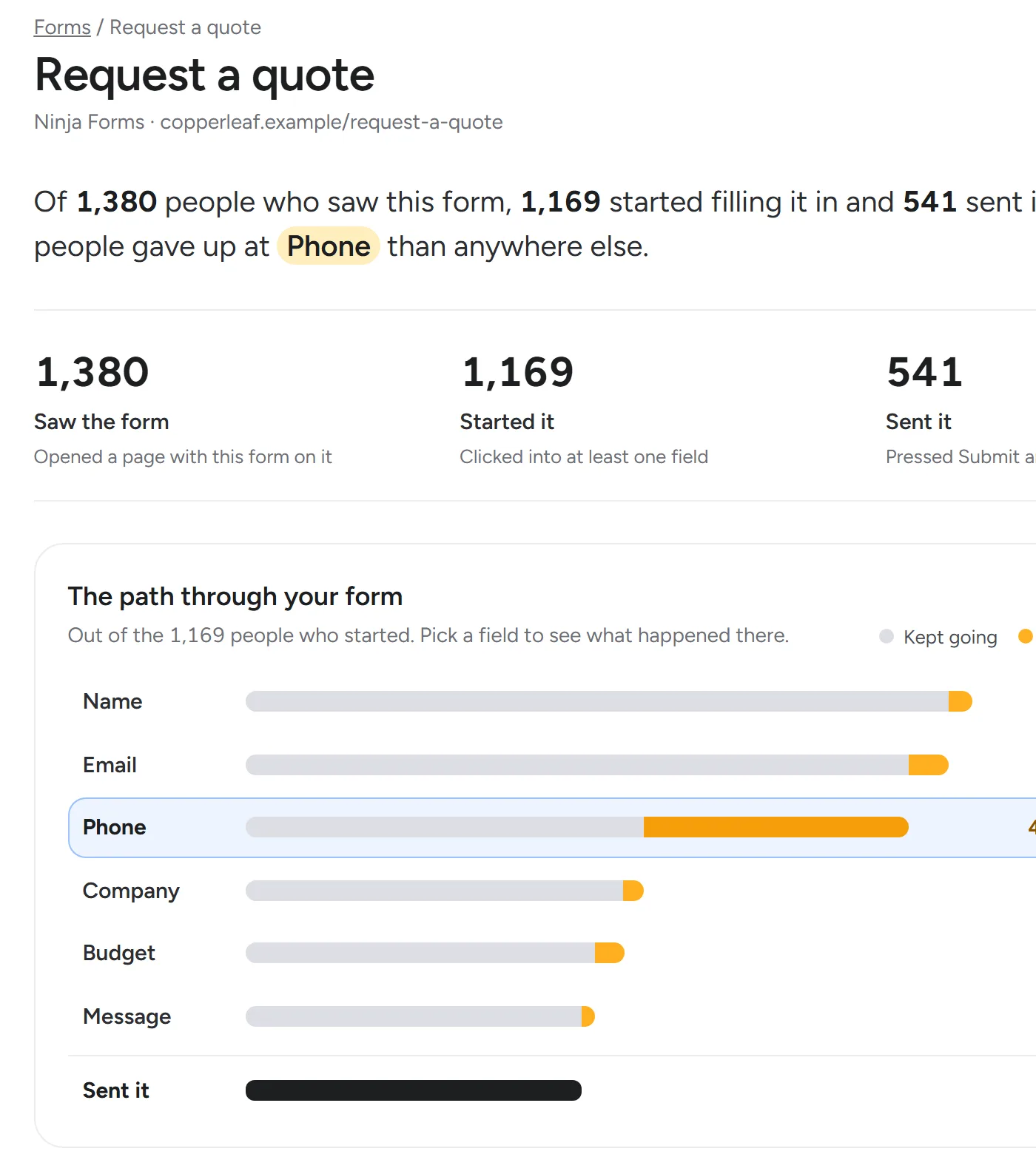
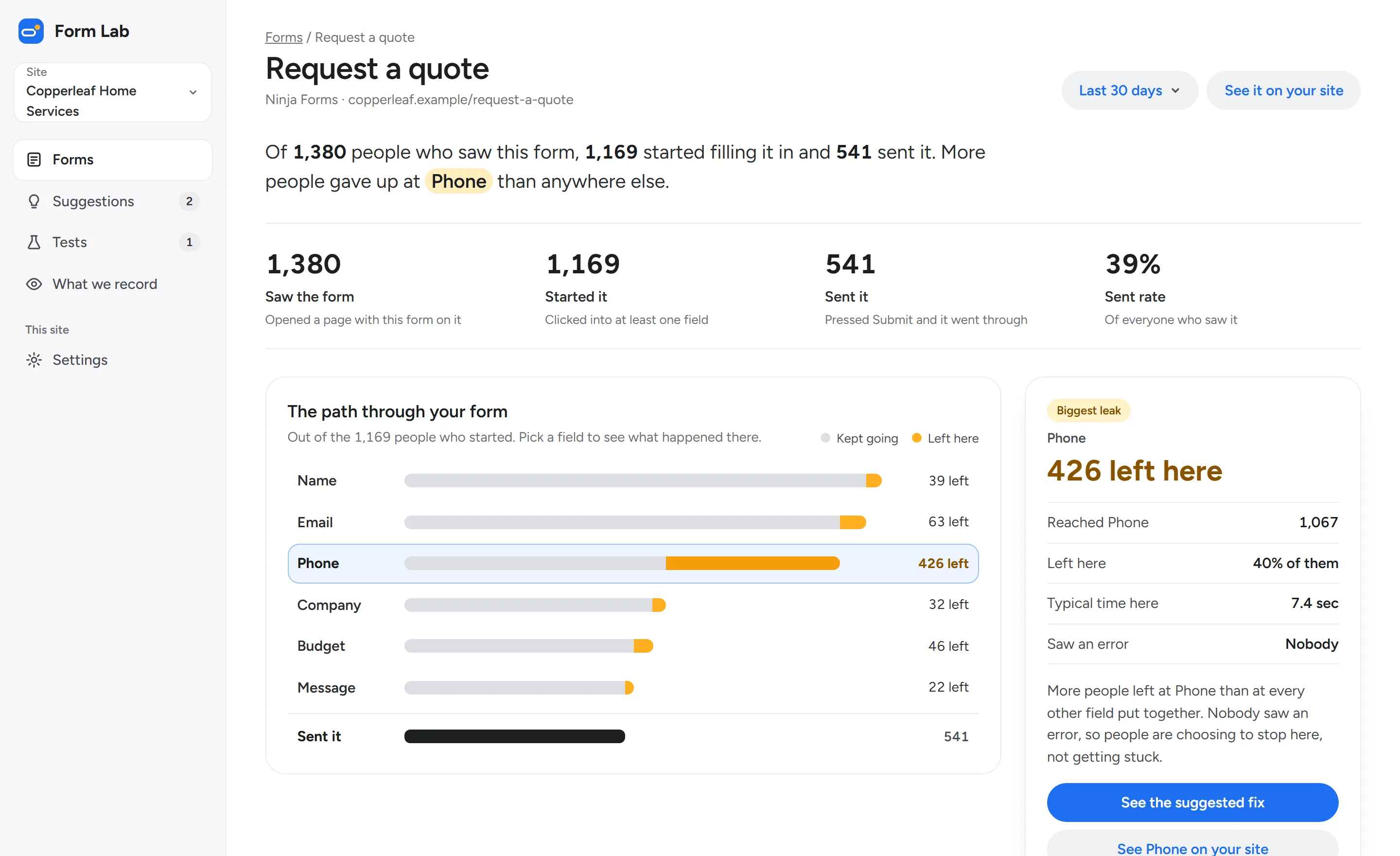
The Form Lab report for a Request a quote form. Of 1,380 people who saw it, 1,169 started and 541 sent it. A bar for each field shows how many people left there, and Phone is marked as the biggest leak, with 426 people leaving.The Form Lab report for a Request a quote form. Of 1,380 people who saw it, 1,169 started and 541 sent it. A bar for each field shows how many people left there, and Phone is marked as the biggest leak, with 426 people leaving.
The form report. Sample data from Copperleaf Home Services, a made-up business.
How it works

Set it up once. Then read the report.

  1. Step 1

    Add the plugin or the snippet

    Install the free plugin from your WordPress dashboard, or paste one line into any other site. Form Lab finds the forms on your pages by itself.

  2. Step 2

    See where people leave, field by field

    Every form gets a report in plain words: how many people saw it, started it and sent it, and which field they gave up at.

  3. Step 3

    Fix it, or test the fix

    Make the suggested change yourself. If the form gets enough visitors, Form Lab can test it first, with half your visitors seeing each version.

Where people leave

Your form tool counts what was sent. Form Lab counts who quit, and where.

On this quote form, 426 people left at Phone. That’s more than every other field put together, and nobody saw an error. They chose to stop.

Each field shows how many people reached it, how many left there, how long they spent, and whether an error message got in their way.

The path through your formKept going Left here

Out of the 1,169 people who started it. Sample data.

  • Name39 left
  • Email63 left
  • Phone426 left
  • Company32 left
  • Budget46 left
  • Message22 left
  • Sent it541
Suggested fixes

Not another chart. A plain suggestion, from your form’s own numbers.

Form Lab looks at the fields that lose the most people, biggest first, and says what to change. Every suggestion shows the numbers behind it, so you decide.

1Biggest leak

Remove the Phone field, or make it optional

426 of the 1,067 people who reached Phone left the form there. Many people don’t want a phone call before they’ve seen a price.

Left at Phone
40%
Of everyone who quit
2 in 3
Views a test needs
1,600

How a test works: half your visitors see the form without Phone, half see it as it is today. Every submission is still saved in Ninja Forms.

Now
With the change
Tests

Try the change on real visitors without losing a single submission.

Half your visitors see the changed form, half see it as it is. Every submission still lands where it always has. When the test finishes, Form Lab tells you which version got more people to send it, and how sure it is, in a sentence.

A test needs enough visitors to mean anything, and most small forms don’t have them. Form Lab says up front whether a form does, so nobody waits weeks on a test that can’t finish.

  • Can testRequest a quote gets about 46 views a day. A test needs about 1,600, so it would take around five weeks.
  • Too few to testNewsletter gets about 90 views a month. Form Lab suggests a fix you can simply make instead.
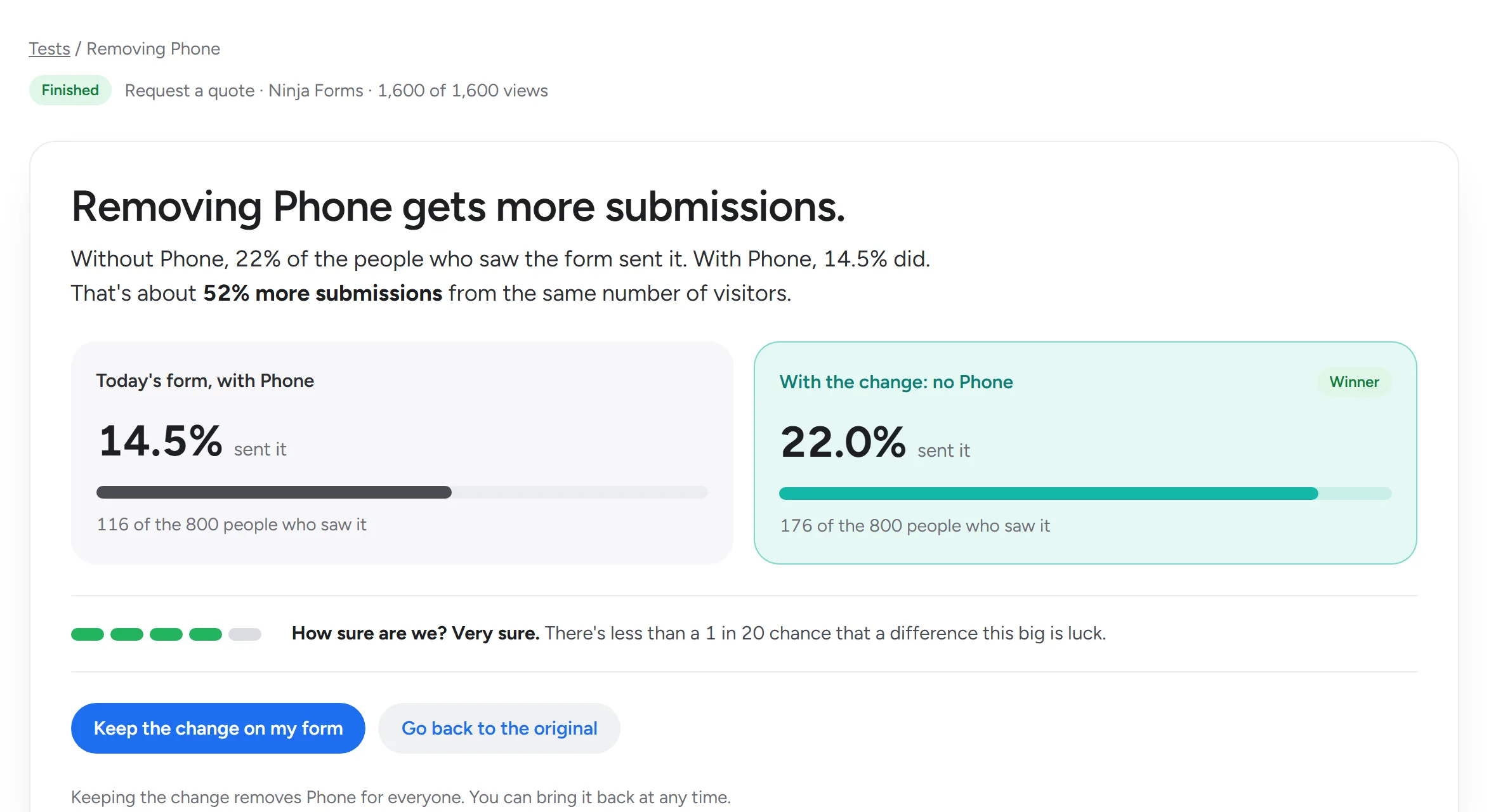
A finished test in Form Lab: removing Phone gets more submissions. 14.5% of people sent the form as it was, and 22.0% sent the version without Phone, marked Winner, with a meter showing Form Lab is very sure.
A finished test. Sample data.

We never record what people type.

Form Lab watches how people move through a form, not what they put in it. Your visitors’ answers stay between them and you.

What Form Lab records

  • Which field someone is in, and when they move on
  • How long they spend on each field
  • Whether they saw an error message
  • Whether the form was sent

What it never records

  • Anything typed into any field
  • Names, email addresses or phone numbers from your form
  • Anything pasted or filled in by the browser

Consent comes first

Form Lab waits for your visitors’ consent by default. You can see the exact data a visit sends, in the console, at any time.

See exactly what we record

Works with

Built for WordPress. Works on any site.

WordPress

A free plugin you install from your dashboard. It finds your forms, connects them to Form Lab and shows each one’s status right in WordPress.

Ninja Forms Deepest support

Every field, every error message, and tests that keep every submission in your Ninja Forms entries, the way they’ve always been.

Any other site

One line of code measures any form drawn in the page, whatever built it: other form plugins, site builders or plain HTML.

One thing it can’t do: forms shown in a frame from another site, such as Typeform or Google Forms. Form Lab can’t see inside those, so it won’t pretend to.

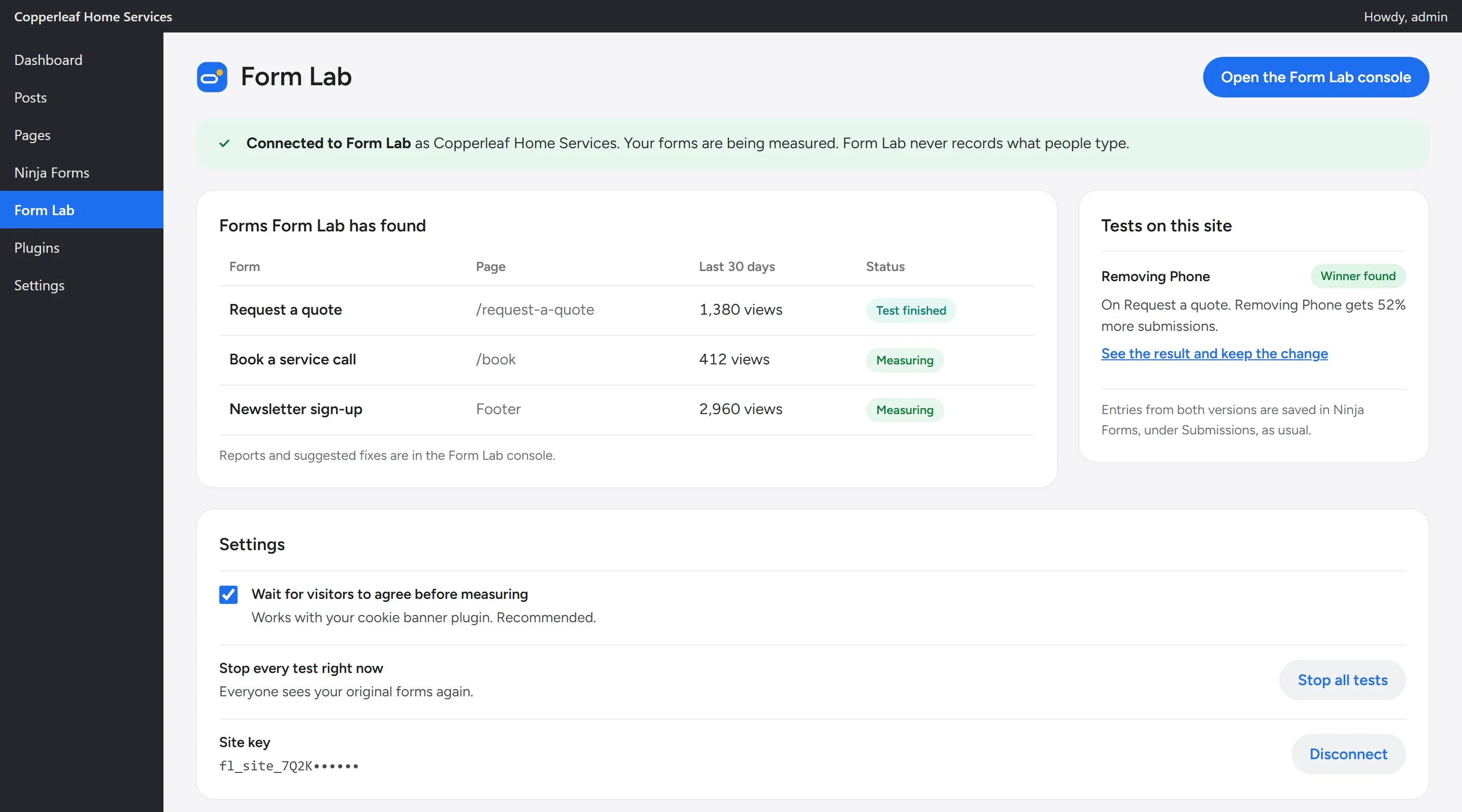
The Form Lab plugin inside WordPress. A banner says the site is connected, a table lists the forms it found with their status, such as Test finished and Measuring, and a card notes that a test found a winner.
The free plugin, inside WordPress. Sample data.
For agencies

Every client’s forms in one console.

Switch between your clients’ sites from one list, and see at a glance which form is losing people this week.

  • A site switcher for up to 25 client sites
  • Reports you can send a client as they are, in plain words
  • Invite each client to see only their own site
  • A weekly email when any client’s field gets worse
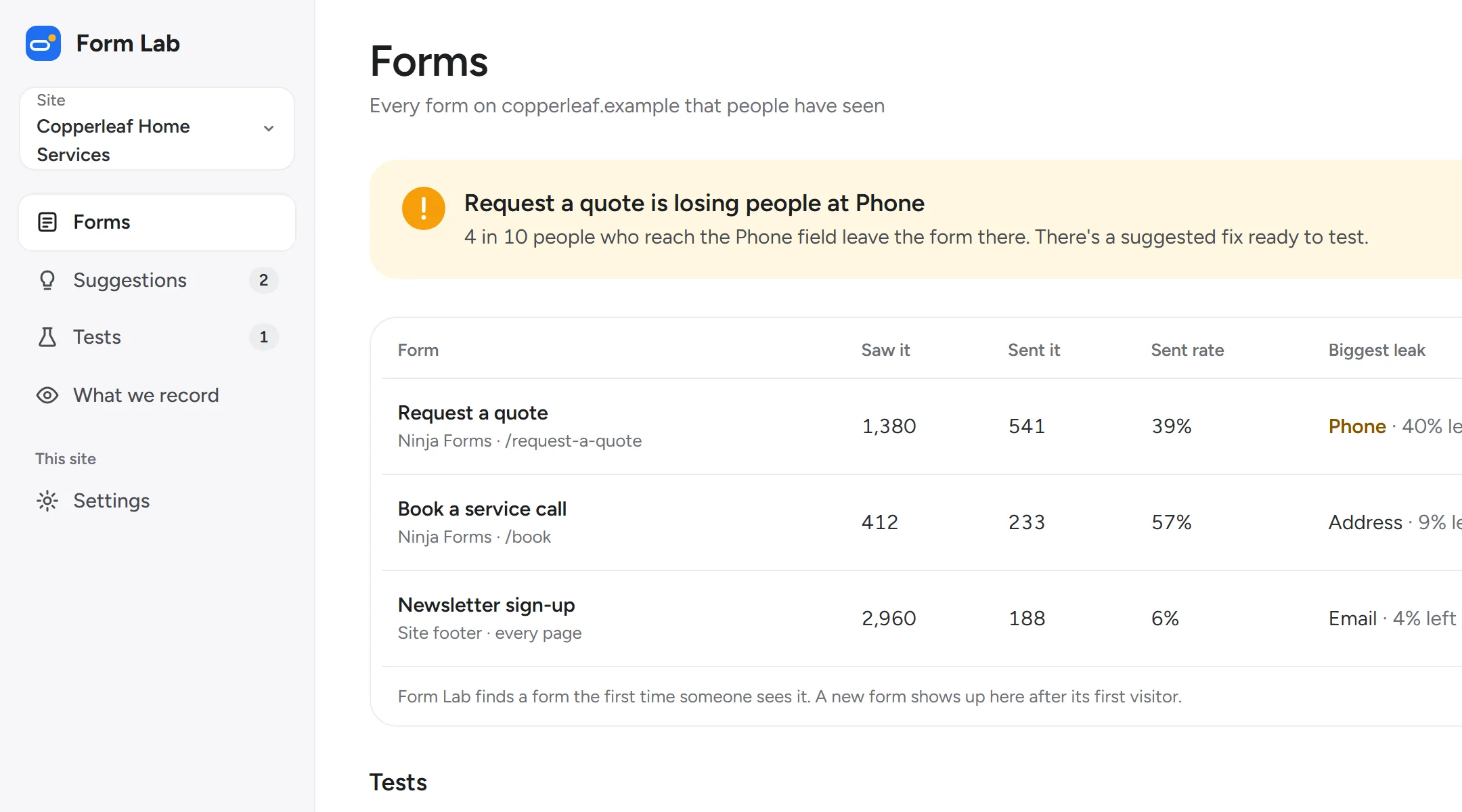
The Forms page in Form Lab, with a site switcher set to Copperleaf Home Services. An alert says Request a quote is losing people at Phone, and a table lists three forms with how many people saw and sent each one.
The forms list, with the site switcher. Sample data.

Questions

Is Form Lab open yet?

Not yet. Form Lab is in early access. Choose a plan to reserve your spot. You won’t pay anything today, and we’ll email you when it opens.

Do I need to know anything about analytics?

No. Reports say what happened in everyday words, like “426 people left at Phone.” Every suggested fix says what to change and why, using your own form’s numbers.

Will it work with my form?

If the form is drawn in your page, yes, whatever tool built it. The WordPress plugin finds your forms by itself, and Ninja Forms gets the deepest detail. Forms shown in a frame from another site, such as Typeform or Google Forms, can’t be measured, so we don’t claim to.

What does Form Lab record about my visitors?

Which field someone is in, when they move on, how long they take, whether they saw an error message, and whether the form was sent. Never what they type. It waits for your visitors’ consent by default. See exactly what we record.

How many visitors does a test need?

It depends on the form. Each form’s page says up front whether it gets enough visitors, and roughly how long a test would take. A typical quote form needs about 1,600 views in total. If yours can’t support a test, we’ll say so and suggest a fix you can simply make.

Is the WordPress plugin really free?

Yes. The plugin is free to install. Reports, suggested fixes and tests come with a plan, from $19 a month.

Why we’re building Form Lab

Every business we’ve built a website for has asked us the same thing: “Why aren’t more people filling in the form?” Their form tool could tell them how many were sent, but not who gave up, or where.

So we built the thing we wanted to hand them: a report that says, in plain words, which field is costing them leads, and what to try. We won’t claim more than the numbers show. If a form doesn’t get enough visitors to test, we’ll say so.

Charles and Andy, Form Lab

Find the field that’s costing you leads.

Three plans, from $19 a month. Reserve your spot now. No payment needed today.